
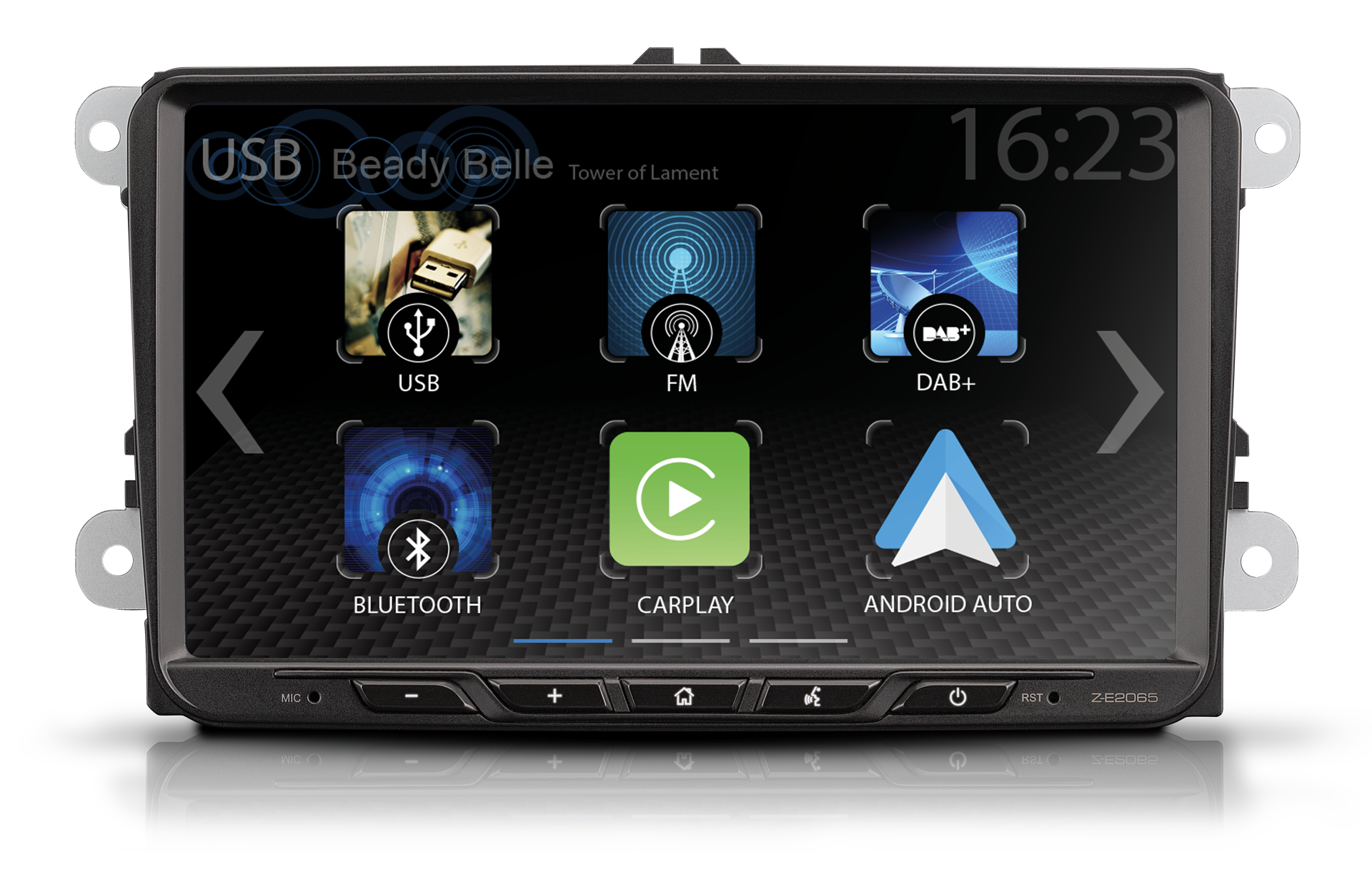

Z-E2065 Vehicle-Specific Infotainment System
The Z-E2065 is shown here as exemplary master device, set forth in the explanations further down below.
While the device models Z-N850, Z-E3771, Z-E2075, Z-E1109 and Z-E1110 are designed with identical feature set and OSDs. This page does therefore show the HMI pages and feature descriptions for Z-E2065 only, while the other models mentioned use and show identical HMI structure and functions.
The Z-E2065 is a top-equipped infotainment system with DAB+ twin tuner, Phase Diversity FM triple tuner, Bluetooth module for hands-free calling and A2DP music streaming, two USB ports for audio and video playback, 4 x 50 watt amplifier, and camera input.
The Z-E2065 enables comprehensive sound tuning via its DSP-IC enhanced audio settings: 5-channel time alignment, graphic 16-band equalizer and active crossover with selectable 12 dB and 24 dB/oct. slopes.

The Z-E2065 supports Wireless Google Android Auto: Navigate, make phone calls, send and receive messages, listen to music – all functions can be controlled conveniently using the Google voice assistant or the infotainer display.
Key Features
- Vehicle-specific infotainment system*1
- Touch sensitive, capacitive 9”/22.9 cm LCD-TFT display with real glass surface
- Works with Wireless Google Android AutoTM, Works with Wireless Apple CarPlay
- DAB+ twin-tuner with dynamic station list, DAB-FM and DAB-DAB Seamless Blending, MOT slideshow, DLS-text
- FM RDS Phase Diversity triple-tuner with 18 preset stations
- Bluetooth 5.0 hands-free module with HFP v1.7 and A2DP music streaming
- 2 x USB port
- 4 x 50 W amplifier
- 5-channel time alignment, graphic 16-band equalizer, active crossover
- Input for a CVBS signal-based (OE) camera system
- Bi-color hard key illumination, selectable white or red

Capacitive 9″ display
The capacitive 9“/22.9 cm LCD TFT touchscreen with glass surface can be operated by light touch. The screen impresses with its high luminosity, wide contrast range and excellent readability.

Powerful DAB+ twin-tuner
The DAB+ twin-tuner offers various comfort functions such as FM-DAB and DAB-DAB Seamless Blending, MOT slideshow und DLS text and impresses with its stable digital radio reception. The dynamic station list shows all stations receivable in the region for direct selection, including the matching station logo stored in the device’s database.
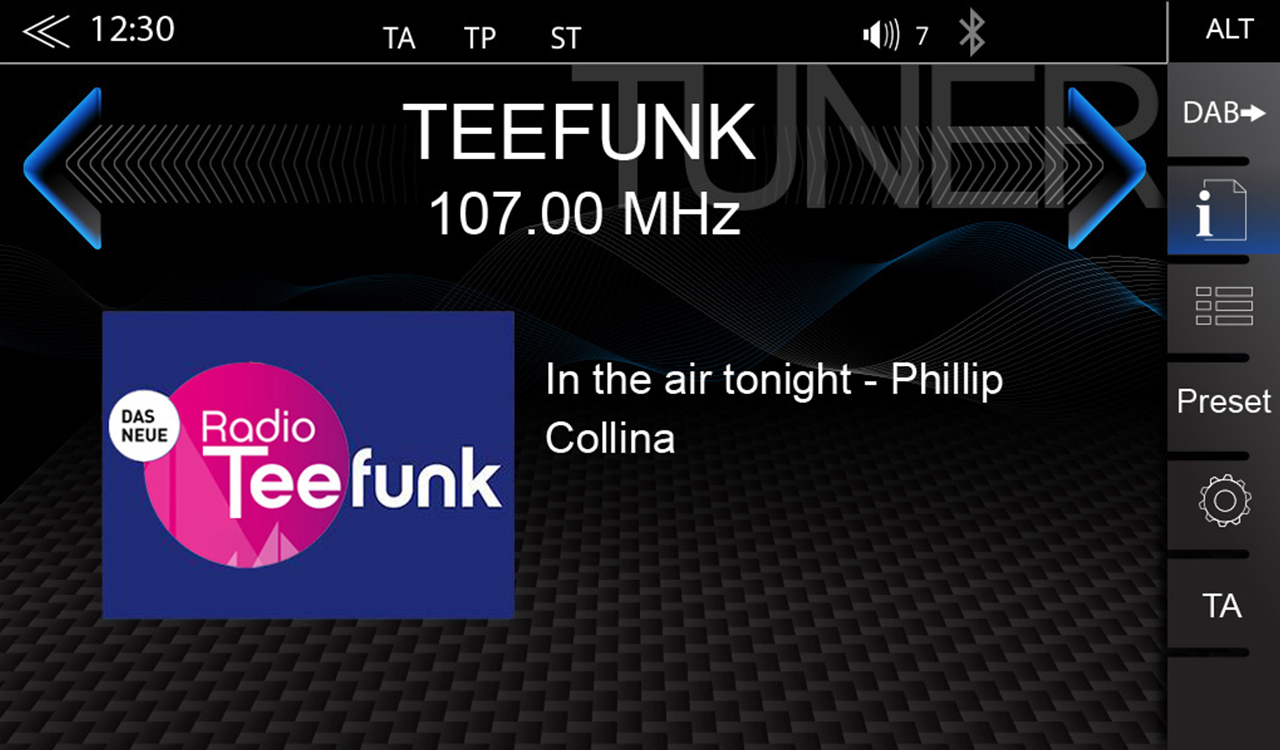
FM RDS triple-tuner
The latest generation FM triple-tuner offers a special configuration: Tuner 1 provides the dynamic station list with all stations receivable in the region. The tuners 2 and 3 operate in diversity mode and thus optimally adjusted to the diversity systems of the target vehicles. The Z-E2065 has a database with radio station logos for the whole of Europe.

Bluetooth 5.0 hands-free module
The modern Bluetooth module convinces with excellent hands-free audio quality. The intuitive user interface makes it easy to use the phone book functions and search for contacts – sorted by first or last name. Via A2DP you can stream music wirelessly from your mobile phone.

Modern multi-format entertainer
The device enables the playback of compressed and uncompressed digital 16- and 24-bit audio files, as well as various popular video formats. Audio and video playback of the following files is supported by the Z-E2065: MP3, FLAC, AAC, WMA, AVI, MPEG-1/2, MPEG4, M4V (H.264), MKV 1080p, XviD.

Various EQ presets
With the 16-band graphic equalizer you can manually tune the sound exactly to the characteristics of your vehicle, or to your personal preferences. You can also select one of the seven predefined EQ profiles to optimize the sound reproduction.
Wireless Android Auto
Smartphones with Android operating system can be connected wirelessly or via USB to use Android Auto. Android Auto is optimized for safe operation in road traffic. The intuitive user interface in combination with voice control via the voice assistant ensures that you can focus 100% on the traffic – despite the wide range of functions.

Wireless Apple CarPlay
Wired or wireless: connect your Apple iPhone via USB or pair it wirelessly via WiFi to use Apple CarPlay. With Apple CarPlay, your favourite smartphone apps are at your fingertips for communication, navigation and entertainment. Almost all CarPlay compatible apps are optimized for Siri voice control and can be operated via it.
Google Android Auto Use
With Google Android Auto you can access compatible apps and online services from your Android Smartphone in your vehicle and intuitively operate them via the screen of your ZENEC device or the Google Voice Assistant.
Prerequisite:
- Ensure that the GPS location services are activated on your Smartphone.
- In order to carry out an initial start-up, the vehicle must be stationary and the handbrake must be applied.
- The Android Smartphone must be coupled with the ZENEC device via Bluetooth beforehand in order to use the handsfree function of Android Auto.
Wired connection via USB
- Connect a compatible Android Smartphone to the USB-1 connection on the rear of your ZENEC device.
- Follow the dialogues on the screen of the Smartphone and the ZENEC device to set up Android Auto and configure the starting behaviour. The selected starting behaviour can also be changed later in the Smartphone device settings [Device Settings] ➔ [Various] ➔ “Android Auto – Autostart” On/Off.
- After successfully completing the initial start-up, the Android Auto user interface automatically appears on the screen of the ZENEC device. If the Android Auto home screen is not automatically displayed:
- [Home] Call up the app overview list.
- Tap on the Android Auto source symbol in the app overview list of your ZENEC device to select the Android Auto source.
Wireless connection via WLAN and Bluetooth
- Activate the mode for wireless coupling via Bluetooth and WLAN and the GPS location services on your Android Smartphone.
INFO: Make sure that your mobile phone is visible. You may need to remain in the Bluetooth settings of your mobile phone during the ZENEC Bluetooth device search with some Smartphone models, or set the visibility of your mobile phone in the Bluetooth settings. - Tap on the “Android Auto source icon” to open the Bluetooth and Wifi device search page.
- Confirm the pop-up.
- Tap on “Add new” to start the Bluetooth device search on your ZENEC system. The Bluetooth name of your Phone appears in a small search list of the ZENEC.
- Select the required Smartphone (Bluetooth name of phone) from the list and tap to “Connect icon”.
- An ID control number is automatically displayed in a pop-up one the smartphone.
- Confirm the respective pop-up with the ID control number on the Phone.
- Android Auto is coupled and the Android Auto Home screen is automatically displayed.
Wireless Android Auto Autostart
If an Android Smartphone has been successfully connected, your Smartphone will automatically connect wirelessly with Android Auto when the next trip takes place.
Operating Android Auto
Android Auto can be operated via the ZENEC screen and the Google Voice Assistant.
- Press the Voice button on the steering wheel or the [Voice] button on the front of the device to activate or start up the Google Voice Assistant on the Smartphone.
- Speak the commands which are known by the Google.
NOTE:
Ensure that you grant the various permissions and authorisations on your Smartphone, otherwise some of the Android Auto functions will not be properly supported.
Ensure that you grant the relevant permission and authorisation for the contact synchronisation on your mobile phone, otherwise the phone book contacts will not be synchronised.
Android Auto may not be available depending on the country variant. Please check out the Android Auto web site for more information.
Android Auto and the associated apps are made available by Google. The scope and content depend on the app provider and can vary depending on the country variant.